%201.png?width=400&height=100&name=Untitled%20(2000%20x%20500%20px)%201.png)
Billing Verification Reminders:
Please review your GigWorkers' hours for the previous week by Monday morning. On Mondays, the system automatically sends a "last call" email from the app to all Location Admins requesting final hour verification for the prior week.
Once that email goes out, you have 24 hours to notify us of any discrepancies. After that window, hours are finalized for billing. It is your responsibility to review and report any corrections within this timeframe.
If you need help verifying time, call your local account manager, or click here for demos.
Invoices:
Invoices are sent weekly on Fridays. These emails relate to your official invoice for payment.
Invoices can be paid directly through Bill.com via ACH or credit card as well as by check via mail and are the official documents for payment processing.
If your business operates on a different pay cycle, we can adjust your invoice schedule to align with your unique pay periods. Please contact your local account manager to discuss available options.
GigWorx Client Portal: Real Time vs. Billing
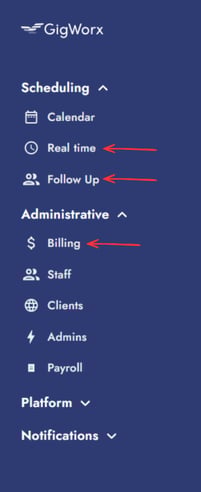
When using the GigWorx client portal the Real Time, Follow Up, and Billing features each serve a specific purpose.
Real Time: Located in the Scheduling tab, the Real Time feature lets you see which workers are on shift right now. You can view start and end times, as well as clock-in status, giving you full visibility into your workforce in real time.
Follow Up: Also under the Scheduling tab, the Follow Up section allows you to review recently completed shifts. This is where you approve timesheets and confirm hours worked for accurate payroll processing.
Billing: Found in the Administrative tab, the Billing section provides a weekly report of all staff who have worked at your site. For each day, you'll see total hours worked, scheduled hours, staff members, and total pay due, along with weekly totals for quick reference.