%201.png?width=400&height=100&name=Untitled%20(2000%20x%20500%20px)%201.png)
When to Use Block Shifts:
Block shifts, which make up a block schedule, are ideal when consistency matters. If you have a project that requires a specific skill set, additional training, or continuity from day to day, booking a multi-day block ensures the same worker supports you throughout the schedule.
It's also a great option if you're considering direct hire and want to evaluate a candidate over several consecutive days before making a decision. Block schedules give you reliability, skill alignment, and the opportunity to assess fit, without committing long term upfront.
How to Post Block Shifts in the GigWorx Client Portal:
Posting block shifts is simple and works just like adding a regular shift, but with a few extra steps:
- Log in to the GigWorx web portal and navigate to the "Calendar" section.
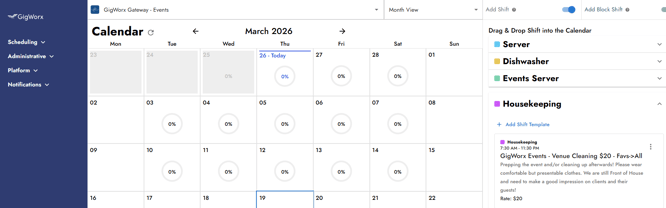
- Enable the Add Shift toggle, then turn on the Add Block Shift toggle (both must be on).
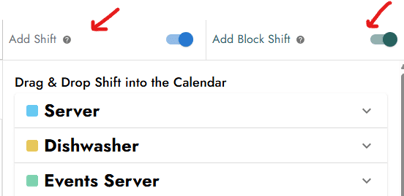
- Select all the days you want the block shift to cover.
- Drag and drop the shift just like you would for a regular gig. You'll notice that the shift now appears on all selected days, and highlighted in green instead of blue.
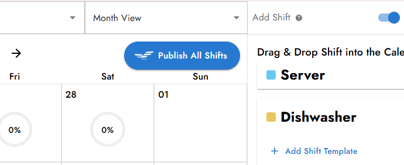
- Turn off the Add Shift toggle to finalize the selection.
- Click "Publish All Shifts" and your block shifts are live!
As always, please don't hesitate to give your local GigWorx a call if you have any questions! We are happy to walk you through this process or handle shift postings for you.